Guide4 min read
How to add music to a workout video
Where to find songs you're allowed to use, what to do if YouTube flags one, and how to keep the music under your voice and the countdown beeps.
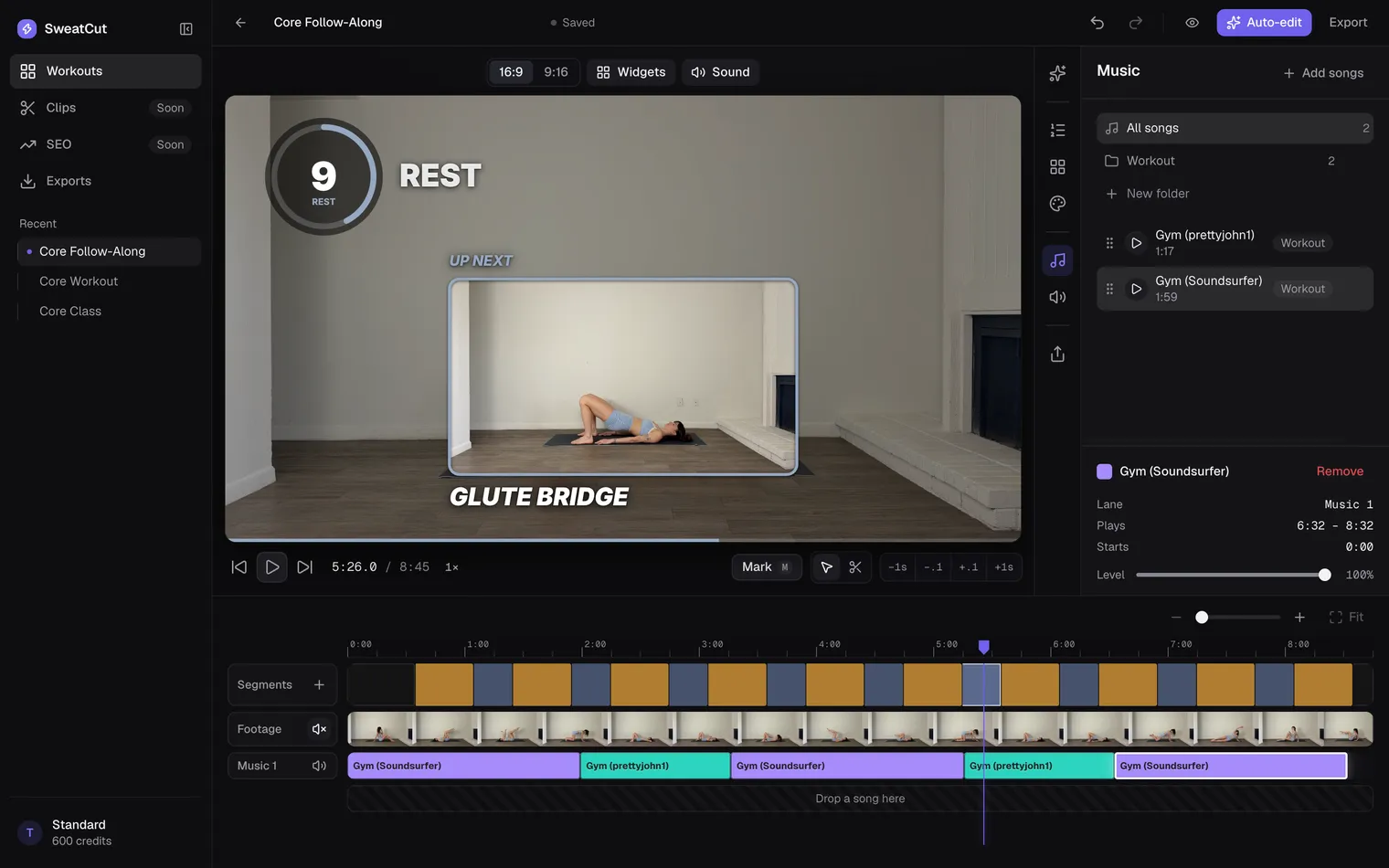
Music keeps people moving through a workout. It just has to be music you’re allowed to use, sitting low enough that people can still hear you and the countdown.
Use songs you have the rights to
YouTube checks every upload with Content ID. If a song in your video matches, its owner decides what happens: block the video, run ads on it and collect the money, or simply track the views.
Buying the song, crediting the artist or using only a few seconds of it doesn’t give you the right to use it. Neither does a Spotify subscription, which is for personal listening.
Where to find music you can use
The YouTube Audio Library
It’s free, right inside YouTube Studio. YouTube says its tracks won’t get a Content ID claim, and you can still monetize the video. Some tracks ask for a credit in the description, and the “Attribution not required” filter hides those.
Meta’s Sound Collection, for Instagram
Instagram’s main music library is for personal, non-commercial use, and some business accounts can’t use it. The Sound Collection is royalty-free and cleared for commercial use. You’ll find it under Audio in the Reels camera.
A licensed music service
Paid libraries sell licences for online video, and some sort their songs by workout style. Before you pay, check:
- that it covers every platform you post to
- that it covers monetized and paid videos
- what happens to videos you’ve already posted if you cancel
Got a claim? You can fix it in YouTube Studio
You can trim out the claimed part, swap the song for an Audio Library track or erase just the song. In a follow-along, though, trimming cuts out part of the workout, and muting can take your cues with it. It’s much easier to get the music right before you export.
Keep the music under your voice
Your voice comes first, the countdown beeps second, and the music sits under both. Set the level by ear:
- Find the busiest minute, where you’re talking over the loudest part of a song.
- Turn the music down until every word is clear.
- Take it down a little more. People are breathing hard and often standing across the room.
- Play it back on a phone speaker. If a word gets lost, it’s still too loud.
Instrumental tracks make this easier. A singer and a coach talking at once is hard to follow mid-set.
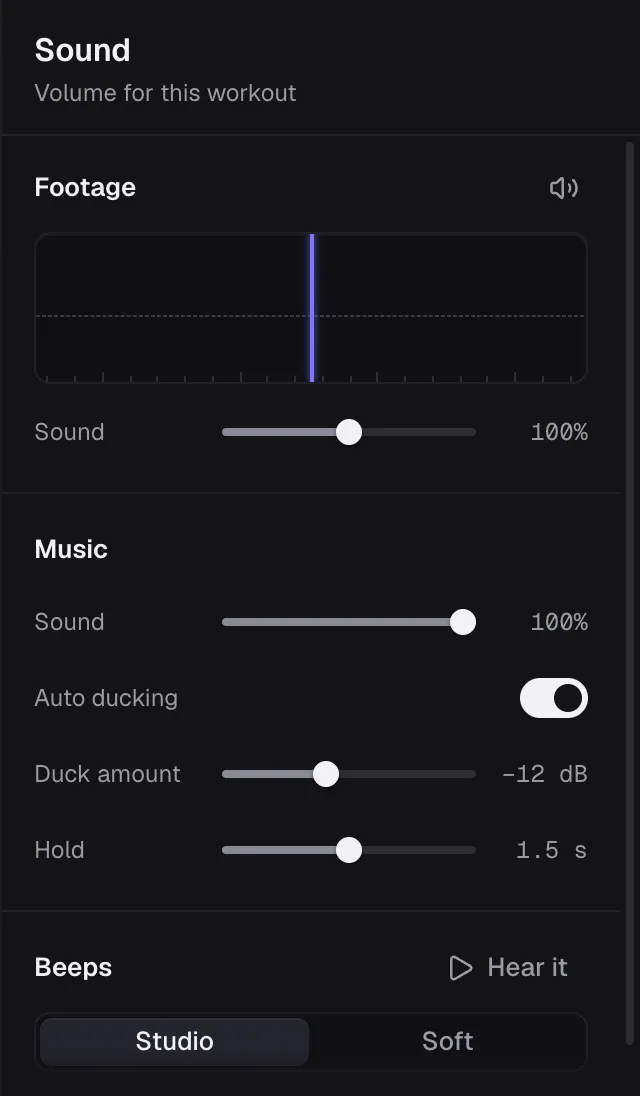
Switch on Auto ducking in SweatCut’s Sound panel, under Music, and the music turns down while you talk, then comes back up when you stop. Duck amount sets how far it goes down, and Hold sets how long it waits after you stop talking.
Dip the music under the beeps
This is called ducking: the music drops while the beeps play, then comes back up. In most editors you set it by hand at every countdown, which on a 20-exercise workout is about 40 dips, and you set them all again on the next video.
In SweatCut it happens on its own. Songs drop under every countdown beep and the ding at each change, then come back up.
Change songs at a rest
Swap tracks during a rest or where the workout changes, like the warm-up into the main set, and never halfway through an interval. A crossfade of two to four seconds suits a short rest. Go longer into the cool-down.
Match the energy as you go: steady songs to warm up, your biggest tracks for the hard blocks and something calmer for the stretch.
Adding music in SweatCut
Drag your songs onto the timeline, across up to three music lanes. Keep them in folders in the song library, like Abs or Pilates. Each song gets its own level, and crossfades run up to 12 seconds, set at the bottom of the Music panel. In the Sound panel, one Sound slider turns all the songs up or down together. The footage gets its own, which goes up to 200% for a voice the camera caught quietly. What you hear in the editor is exactly what exports.
SweatCut doesn’t come with music, so bring songs you have a licence for. And skip playing music while you film: it records on top of your voice. How to film a workout video covers the rest of the setup.
Questions
Can I use Spotify songs in a workout video?
No. A Spotify subscription is for personal listening, and its terms rule out making the music available to the public. Use music with a licence that covers the platforms where you post.
Does crediting the artist stop a copyright claim?
No. YouTube and Instagram both say credit doesn't give you the right to use a song. The exception is music under a Creative Commons licence, where the credit is the condition of use.
Can I monetize a video that uses YouTube Audio Library music?
Yes. YouTube says Audio Library tracks won't be claimed through Content ID, and creators in the YouTube Partner Program can monetize videos that use them.
Does SweatCut come with music?
No. You bring your own songs, and SweatCut dips them under every countdown beep on its own. Switch on Auto ducking and it also turns them down while you talk.